
Start here: your venue ready in eight steps
The “Getting started” assistant walks you through business, rooms, opening hours, team, payments, notifications, customers and your booking page. · 3 min read
When you sign up, Primeros pasos (Getting started) appears in the menu. There are eight steps and none of them has to be done in one go: press Lo termino luego (I’ll finish later) and pick it up another day.
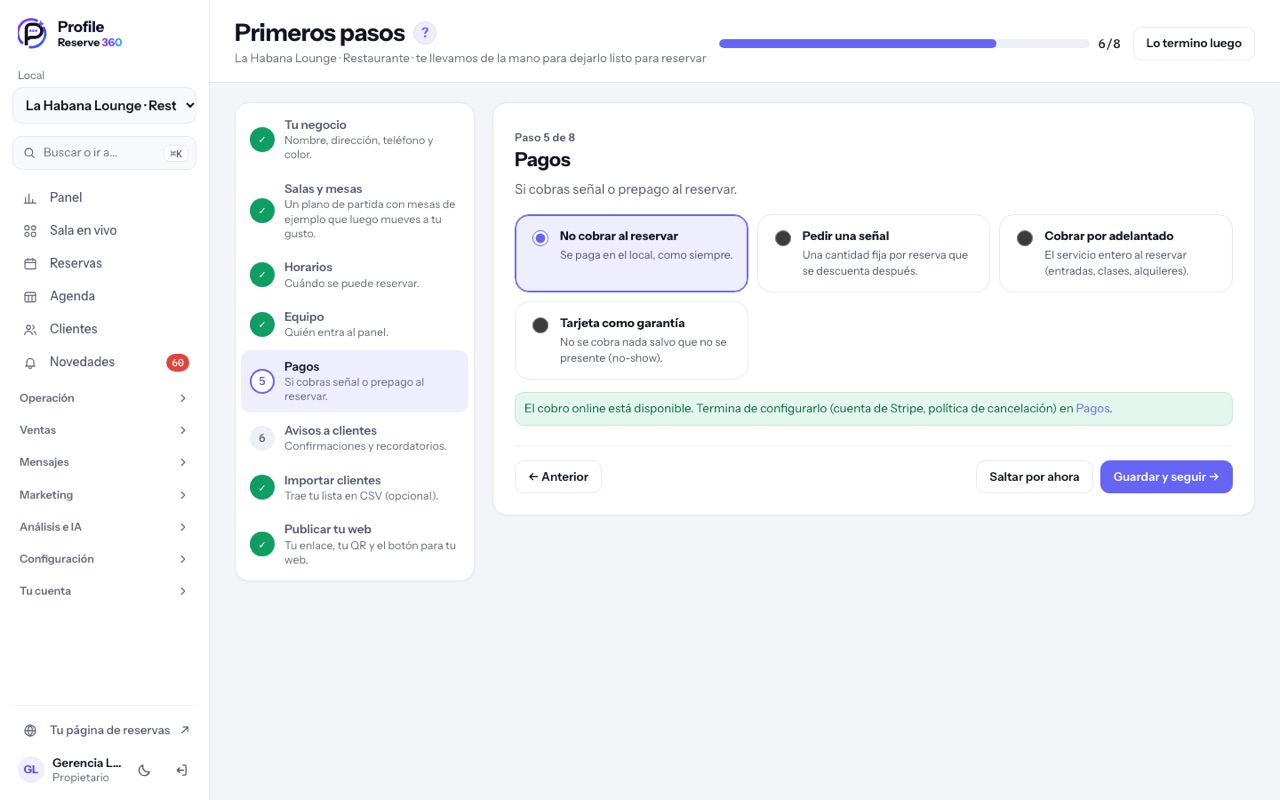
- Your business: name, address, phone and colour. The sector you choose decides the menu and the wording (table, chair, court…).
- Rooms and tables: a starter floor plan with sample tables that you can rearrange in El plano del local y su editor (2D y 3D).
- Opening hours: when people can book.
- Team: who else signs in (see Equipo, roles y permisos).
- Payments: whether you take a deposit, prepayment or a card guarantee. Otherwise everything is paid at the venue, as usual.
- Customer notifications: confirmations and reminders.
- Import customers: bring your list as a CSV (optional).
- Publish your page: your link, your QR code and the button for your own website (see Tu página de reservas).
Tip: every screen shows a short guided tour the first time you open it. If you skip it, it is always under the ? button next to the title.